Google Maps Scraper: Build Local Data Pipelines That Actually Run

You do not need another CSV export that works once and quietly dies three days later. A Google Maps scraper is useful because local business data changes constantly: new locations open, phone numbers disappear, ratings move, competitors expand, and sales teams need fresh lists instead of stale spreadsheets. The same pattern shows up in job scraping and browser API workflows. The real question is not "Can this scrape a page?" It is "Can this keep producing structured data when the site scrolls, r
- 1A Google Maps scraper is strongest when it captures structured local business data and refreshes it on a schedule, not when it produces a one-time lead list.
- 2Job scraping has lower keyword difficulty and strong use-case overlap: recruiters, analysts, and vertical SaaS teams need clean, deduplicated listings.
- 3A browser API becomes necessary when the workflow has to run repeatedly, handle JavaScript, reuse sessions, and deliver JSON or CSV into another system.
- 4No-code templates are the fastest path for repeatable workflows; custom browser APIs are better when the output feeds production systems.
- 5The best setup combines targeting rules, anti-bot handling, validation, deduplication, and delivery instead of treating scraping as a single script.
What Is a Google Maps Scraper?
A Google Maps scraper is a workflow that extracts publicly visible business information from Google Maps search results and place pages. Typical fields include business name, address, category, rating, review count, phone number, website, hours, pricing signals, and location details.
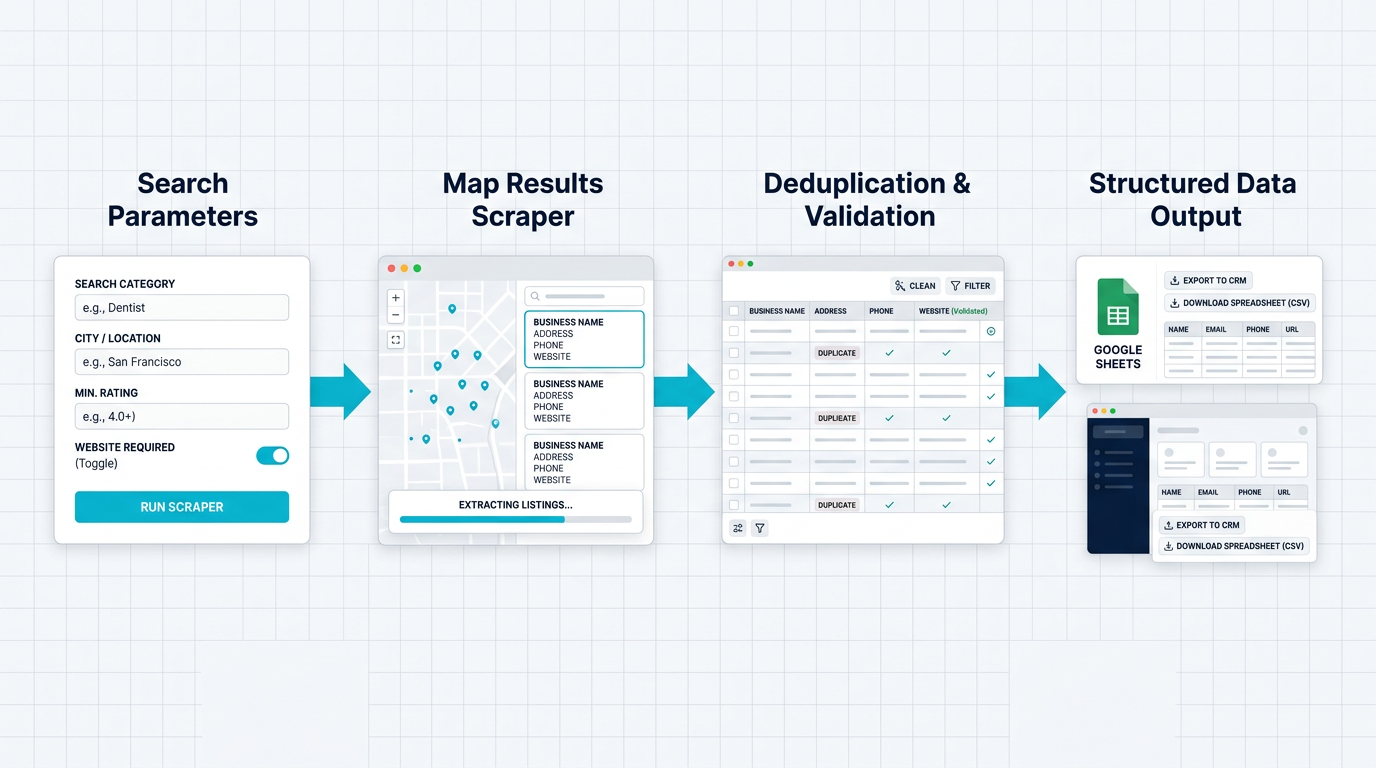
A production maps scraper needs targeting, validation, deduplication, and delivery—not just export.
The simple version exports rows.
The useful version answers a business question:
- Which dentists in Austin have 4.5+ stars but no modern website?
- Which restaurants opened in the last six months in a specific neighborhood?
- Which local service businesses have enough reviews to be attractive partners?
- Which competitors are expanding across a metro area?
- Which companies should a sales team enrich before outreach?
That is why the best Google Maps scraper setup starts with a targeting model, not a browser.
If you just need a fast starting point, the Google Maps Scraper template handles keyword + location searches and exports structured business data without asking your team to maintain selectors.
Why Maps Scraping Fails in Production
Most failed scraping projects do not fail on the first run. They fail after the team starts depending on them.
The first run is exciting. The spreadsheet fills with 500 local businesses. Everyone sees the promise. Then a week later, half the records are duplicates, the same search only returns a thin slice of the market, ratings are missing, or the workflow gets stuck on infinite scroll.
Here is the practical difference:
The important part is not which option sounds most technical. It is matching the tool to the operational load.
Pro Tip: Before scraping any local market, define the "unit of value." For sales, it might be a business with phone + website + category. For local SEO, it might be rating + review count + category + geo area. For market research, it might be density by neighborhood. The field list changes depending on that answer.
The Practical Google Maps Scraper Workflow
The workflow below is the version that survives past the demo.
1. Start with a search matrix
Do not run one broad search like "restaurants New York" and call the output complete. Maps search results are shaped by category, proximity, query wording, and result caps.
A better search matrix includes:
- Service category: "plumber", "orthodontist", "coffee shop", "auto repair"
- Location unit: city, zip code, neighborhood, county, or radius
- Variant terms: "emergency plumber" vs "plumbing company"
- Quality filters: rating threshold, review count, open now, website present
- Exclusion rules: chains, irrelevant categories, duplicates
This matters because Google Maps is not a database dump. It is a search interface. You get cleaner data when you treat the input as a campaign plan.
2. Extract the fields your team will actually use
The default instinct is to scrape everything. That creates bloated exports nobody trusts.
Start with fields that drive action:
If you are building a lead list, phone and website are more important than scraping every visual detail. If you are doing local SEO analysis, category, rating, review count, and location become more important.
3. Handle scrolling and pagination deliberately
Maps-style interfaces often load more results as you scroll. A scraper that only reads the first visible panel creates a biased dataset. You need the workflow to scroll, wait for new results, detect when no new listings are loading, and stop cleanly.
That is where a browser-based approach beats raw HTTP requests. The browser sees the rendered interface, waits for JavaScript, and interacts with the page like a user would.
Pro Tip: Put a hard cap and a "no new records after N scrolls" rule in the workflow. Unlimited scroll sounds nice until it burns credits, repeats the same records, or runs into a soft block.
4. Normalize and deduplicate before anyone touches the data
Local business data is messy. The same business can appear with small variations in name, address, or phone formatting. If you push raw rows into a CRM, the cleanup cost moves downstream.
Use a dedupe key such as:
- Normalized business name
- Phone number
- Website domain
- Address + category
- Maps place URL when available
Then tag the source query that found each record. That gives you two useful things: a cleaner dataset and a way to explain why a lead exists.
5. Deliver the output where work happens
CSV is fine for review. It is not always the final destination.
A production workflow usually sends data to:
- Google Sheets for lightweight operations
- Airtable for campaign planning
- HubSpot or Salesforce for outreach
- A database for enrichment and scoring
- n8n, Make, or Zapier for automation
- A webhook endpoint for internal tools
This is where a BrowserAct Data API becomes useful. Instead of downloading a file manually, the scraping workflow can run asynchronously and return structured data through API polling or webhooks.
Where Job Scraping Fits
Job scraping looks like a different category, but operationally it has the same shape: dynamic pages, changing layouts, duplicate records, partial data, and a strong need for structured output.
The keyword opportunity is also different. Local Ahrefs exports show "job scraping" at lower difficulty than many generic scraping terms, which makes it useful for supporting content and conversion pages. More importantly, the use cases are concrete:
- Recruiters tracking new roles by company, region, or skill
- Market researchers measuring hiring trends
- Vertical SaaS teams monitoring customer signals
- Job boards aggregating niche listings
- Sales teams finding companies that are actively hiring
The Multi-Platform Job Scraper is a good example of why templates matter. The hard part is not "get some text from a job page." The hard part is getting title, company, location, salary, description, and source URL consistently across different job boards.
Maps data and job data are stronger together
The interesting play is combining both datasets.
For example:
- Scrape Google Maps for "home health care agencies in Florida."
- Scrape job boards for the same companies hiring caregivers or nurses.
- Prioritize companies with multiple locations and active hiring.
- Send the final list to a CRM with source URLs attached.
That is no longer "scraping." That is account intelligence.
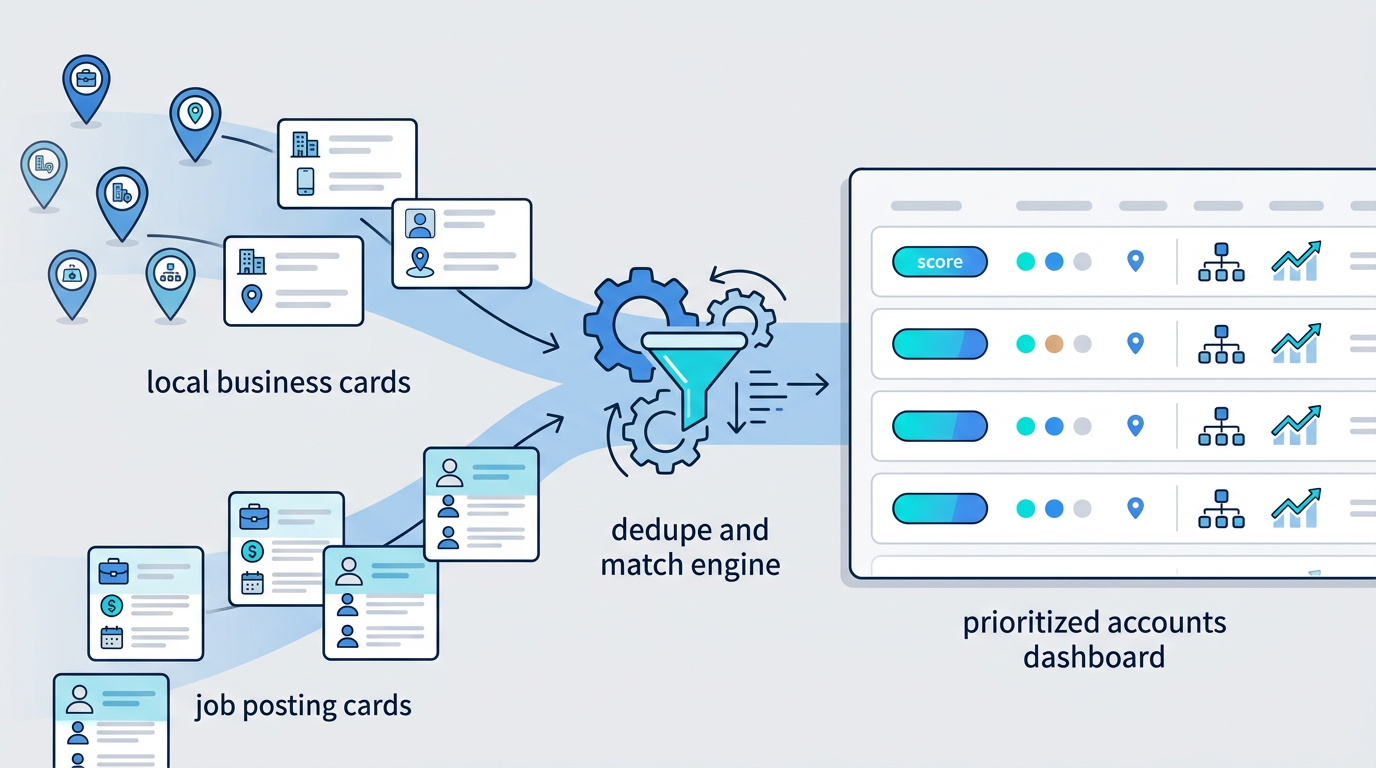
Maps data tells you who exists. Job scraping tells you who is changing. Together, they create better account signals.
The same idea works for restaurants hiring managers, dental offices hiring hygienists, logistics firms hiring drivers, or SaaS companies hiring sales roles.
Pro Tip: For job scraping, deduplicate by company + title + location + source URL. Job posts are often syndicated across boards, so URL-only dedupe misses duplicates and title-only dedupe collapses legitimate listings.
When to Use a Browser API Instead of a Template
A template is the fastest path when the source and output are known. A browser API is better when the workflow becomes part of a product or internal system.
Use a browser API when:
- Another app needs to trigger the scrape on demand
- You need results returned as JSON to a backend
- The workflow has to run on a schedule
- You need webhooks when tasks finish
- You need session reuse, cookies, or login support
- You need consistent retry behavior
- You want one API endpoint instead of several manual browser steps
The mental model is simple: a template helps a person run a workflow; a browser API lets software run that workflow.
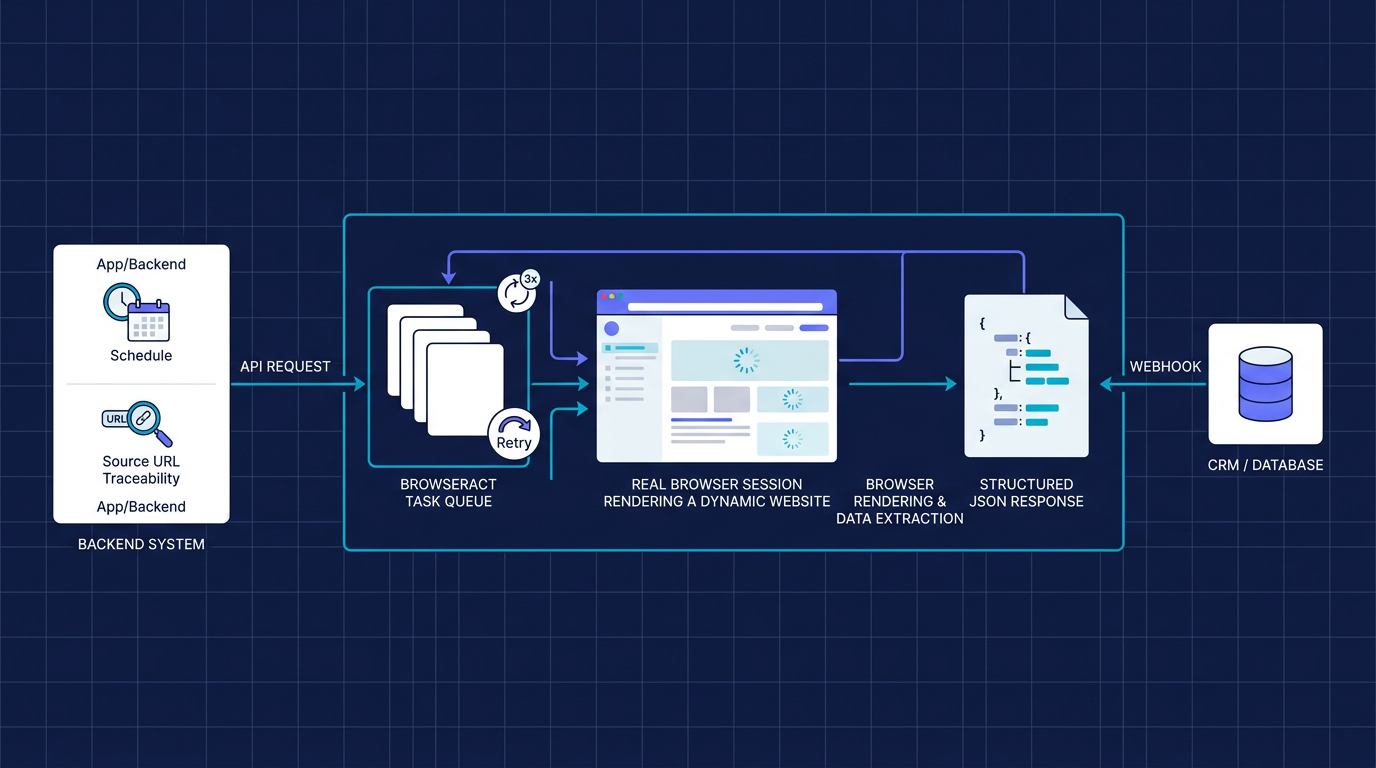
A browser API turns a repeatable scraping workflow into infrastructure your product or operations stack can call.
A typical API response might look like this:
{
  "taskId": "task_123",
  "status": "completed",
  "source": "google_maps",
  "query": "orthodontists in phoenix",
  "records": [
    {
      "businessName": "Example Orthodontics",
      "category": "Orthodontist",
      "rating": 4.8,
      "reviewCount": 214,
      "phone": "+1-555-0100",
      "website": "https://example.com",
      "mapsUrl": "https://maps.google.com/..."
    }
  ]
}
That structure is what makes scraping usable by a sales app, enrichment pipeline, or AI agent. The browser does the messy interaction work; the API gives your system predictable data.
Run the scrape once with browser-act. Package the repeatable path with Skill Forge.
- 1. An agent uses browser-act to search Google Maps, scroll listings, inspect place pages, and extract visible fields.
- 2. The team validates the schema: business name, category, address, phone, website, rating, review count, and source URL.
- 3. browser-act-skill-forge turns the proven flow into a reusable scraper Skill for future agent runs.
Google Maps Scraper vs Google Maps Scraper API
The phrase "Google Maps scraper" usually means a tool or workflow. "Google Maps scraper API" means the same extraction capability is callable from software.
If a marketer owns the workflow, start with a template. If an engineering team owns the workflow, expose it as an API. If an AI agent owns the workflow, give it two layers: a browser execution layer for the live site, and a reusable skill layer once the path is proven.
For example, an agent can use the browser-act skill to open Google Maps, search a category and location, scroll the result list, inspect business cards, capture visible fields, and return structured rows. When that same Google Maps scraper needs to run repeatedly, browser-act-skill-forge can turn the verified browser workflow into a reusable skill package that other agents can call.
Data Quality Checklist
Before a maps scraper or job scraper feeds a real process, run this checklist:
- Completeness: Are the fields needed for action present?
- Freshness: When was the data collected, and how often will it refresh?
- Traceability: Can each record link back to its source page?
- Deduplication: Are repeated businesses or jobs collapsed safely?
- Validation: Are phone numbers, domains, ratings, and locations normalized?
- Failure handling: What happens when a run hits a block, timeout, or layout change?
- Delivery: Does the data land where the team already works?
Most scraping issues become expensive because nobody answers these questions until after the data has already been imported.
Legal and Ethical Notes
Scraping public data still needs guardrails. Respect site terms, avoid collecting sensitive personal information, do not overload services, and use the data for legitimate business purposes. For regulated workflows, get legal review before automating collection at scale.
For local business and job data, the safer pattern is to collect publicly visible business facts, keep source URLs, avoid deceptive behavior, and honor removal requests when applicable.
This is also another reason to prefer managed workflows over improvised scripts. Rate limits, retries, scheduling, and output validation are not just technical niceties. They reduce operational risk.
How BrowserAct Fits
BrowserAct is built for the middle ground between "write a brittle scraper from scratch" and "buy a rigid dataset that does not match your workflow."
For an agent-led Google Maps scraper, the workflow usually has two layers:
1. Use browser-act for live browser execution
The agent uses browser-act when it needs to operate the rendered website: open Google Maps, type a query, click filters, scroll result lists, inspect place pages, take screenshots, read network activity, and extract the business fields already visible in the browser.
This is the right layer for exploration, QA, one-off research, and debugging. It lets the agent act like a careful operator instead of guessing from static HTML.
2. Use Skill Forge for repeatable scraper workflows
Once the extraction path is stable, browser-act-skill-forge is the layer that turns the workflow into a reusable skill. The agent explores once, verifies the method, generates a skill package, and future runs can call that skill instead of rediscovering the site from scratch.
That distinction matters. A sales team may only need one export this week. A growth team may need the same Google Maps scraper to run across 50 cities every Monday. The first case can stay close to browser-act execution; the second should become a skill or API-backed workflow.
No rewrite. Just a more mature delivery path: execute once, verify the fields, then package what repeats.
Conclusion
A Google Maps scraper is not valuable because it can copy business names from a page. It is valuable when it turns local search into a repeatable data source: targeted, refreshed, deduplicated, and delivered into the systems where people make decisions.
The same is true for job scraping. The same is true for any browser API.
If the goal is a one-time export, use a template and move fast. If the goal is an agent-owned workflow, start with browser-act so the agent can operate the real site. If the goal is a reliable data product, use browser-act-skill-forge or the BrowserAct Data API so the scraper becomes a repeatable part of your pipeline.
Start with the Google Maps Scraper template, then move the workflow into a reusable skill or the BrowserAct Data API when your team is ready to automate it end to end.
Two Skills, One Repeatable Browser Workflow
Start with live browser execution when the agent needs to understand a page. Move to Skill Forge when the same scraper should run again without re-exploring the site.
Run once with browser-act
Give Codex, Claude Code, Cursor, Windsurf, or another agent a real browser for rendered pages, clicks, scrolling, screenshots, DOM extraction, and network inspection.
Open browser-act SkillPackage with Skill Forge
Explore the site once, verify the extraction path, then generate a callable Skill package that other agents can reuse for batch jobs or scheduled workflows.
Open Skill ForgeFrequently Asked Questions
What is a Google Maps scraper?
A Google Maps scraper extracts publicly visible business data such as names, addresses, ratings, reviews, phone numbers, websites, and categories from Google Maps.
Is Google Maps scraping legal?
It depends on the jurisdiction, use case, data type, and site terms. Collect public business facts responsibly, avoid sensitive data, and get legal review for scaled workflows.
What can a maps scraper collect?
Common fields include business name, address, category, phone, website, rating, review count, hours, price signals, and source URL.
How is job scraping different from maps scraping?
Job scraping focuses on titles, companies, locations, salaries, descriptions, and posting URLs, but it has similar challenges around JavaScript rendering, duplicates, and refresh schedules.
When should you use a browser API?
Use a browser API when another system needs to trigger the scrape, receive structured JSON, run jobs on a schedule, or integrate results through webhooks.
Can BrowserAct scrape Google Maps without code?
Yes. BrowserAct offers a no-code Google Maps Scraper template and can also expose scraping workflows as Data APIs for production integrations.

Relative Resources

Using AI Browser Automation for Software Testing and Frontend Debugging

Chrome DevTools MCP Invalid URL Error: How to Fix Initialize Failures

AI Computer Use Security: How to Sandbox Agents Before They Touch Your Browser and Files

AI Browser Automation Login Problems: Google Auth, 2FA, and Manual Takeover
Latest Resources

Remote Assist for Browser Automation: Human Handoff Without Breaking the Agent

Headless Browser Automation With Human Takeover

From Browser Scripts to AI Operators: Why Teams Need Auditable Browser Workflows
